> For the complete documentation index, see [llms.txt](https://docs.firework.com/firework-for-developers/llms.txt). Markdown versions of documentation pages are available by appending `.md` to page URLs; this page is available as [Markdown](https://docs.firework.com/firework-for-developers/android-sdk/integration-guide/shoppable-videos/cart-and-checkout.md).
# Cart & Checkout
Your app manages cart contents and checkout. The SDK provides shopping callbacks, button states, and presentation options:
* [Shopping CTA Button](#shopping-cta-button) - Primary CTA clicks, status, and result messages
* [Customize Shopping CTA Button](#customize-shopping-cta-button) - Style the primary CTA
* [Secondary Shopping CTA](#secondary-shopping-cta) - Secondary CTA clicks, status, and styling
* [Player Deck one-tap Add to Cart](#player-deck-one-tap-add-to-cart) - Add items directly from deck cards
* [Shopping Cart](#shopping-cart) - Cart behaviors and callbacks
* [Product Detail Page (PDP)](#product-detail-page-pdp) - PDP link button configuration
* ["Shop Now" Mode](#shop-now-mode) - Direct navigation without a cart
* [Error Handling](#error-handling) - Shopping error events
* [Programmatic Control](#programmatic-control) - Dismiss shopping UI, open cart
## Shopping CTA Button
The primary shopping CTA button appears on the product detail page and triggers the add-to-cart or shop-now action. The secondary CTA and Player Deck button use separate callbacks and status APIs:
| Button | Click listener | Status API | Result messages |
| ------------------------------- | -------------------------------- | ---------------------------------------------------------------------- | ----------------------------------------------------------------------------------------- |
| Product-detail primary CTA | `setOnCtaButtonClicked` | `setCtaButtonStatus(...)`, `setCtaButtonStatusWithDefaultMessage(...)` | Optional message and dismissal overloads since 6.35.2; SDK default messages since 6.36.1. |
| Product-detail secondary CTA | `setOnCtaSecondaryButtonClicked` | `setCtaSecondaryButtonStatus(status)` | No message or dismissal overload. |
| Player Deck one-tap Add to Cart | `setOnDeckAddToCartListener` | `request.setStatus(status)` | Per-request button state; no message or dismissal overload. |
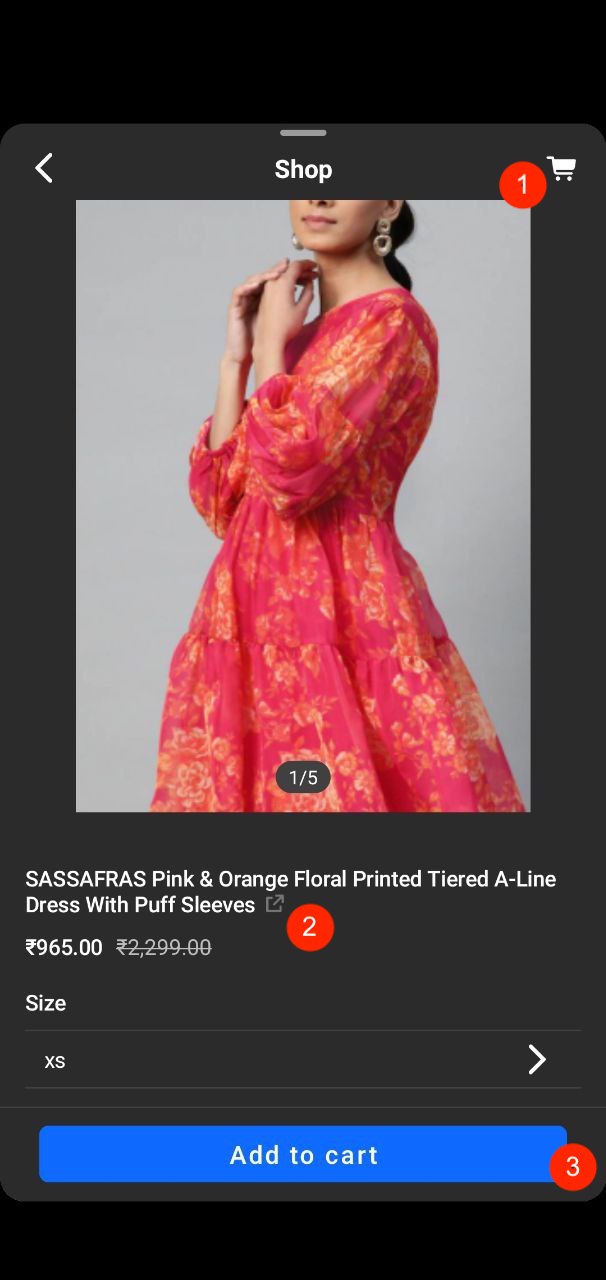
Product details page - CTA button (3)
### CTA Button Click Listener
Register `setOnCtaButtonClicked` as shown below. It receives the commerce product ID, selected variant ID, variant URL, video information, and the product when available.
| Parameter | Type | Meaning |
| --------------- | ----------- | --------------------------------------------------------------------------- |
| `productId` | `String` | Commerce product ID (`Product.id`). |
| `unitId` | `String` | Selected commerce variant ID (`ProductUnit.id`), not the SDK's internal ID. |
| `productWebUrl` | `String` | URL of the selected variant. |
| `videoInfo` | `VideoInfo` | Video context; use `videoInfo.id` for the video ID. |
| `product` | `Product?` | Full product data when available. |
```kotlin
FireworkSdk.shopping.setOnCtaButtonClicked { productId, unitId, productWebUrl, videoInfo, product ->
// Perform your add-to-cart or navigation action.
// Report completion using setCtaButtonStatus, as shown below.
}
// When the registering screen is destroyed:
FireworkSdk.shopping.setOnCtaButtonClicked(null)
```
All listeners on this page are global. Register them for the owning screen and remove them with `null` when it is destroyed. For asynchronous operations, use an Activity or Fragment view lifecycle owner and keep blocking/network work off the main thread.
### CTA Button Status
Use `FireworkSdk.shopping.setCtaButtonStatus` to update the product-detail primary CTA after your cart operation. Starting with **6.35.2**, you can also provide a success or error message and optionally close product details while leaving the player open.
```kotlin
import androidx.lifecycle.LifecycleOwner
import androidx.lifecycle.lifecycleScope
import com.firework.sdk.FireworkSdk
import com.firework.shopping.Shopping.CtaButtonStatus
import kotlinx.coroutines.CancellationException
import kotlinx.coroutines.launch
// addToCart is your suspending cart operation. Return on success and throw on
// failure. Keep blocking/network work off the main thread in its implementation.
fun registerProductDetailCartHandler(
owner: LifecycleOwner,
addToCart: suspend (productId: String, unitId: String) -> Unit,
successMessage: String,
errorMessage: String,
) {
FireworkSdk.shopping.setOnCtaButtonClicked { productId, unitId, _, _, _ ->
owner.lifecycleScope.launch {
FireworkSdk.shopping.setCtaButtonStatus(CtaButtonStatus.Loading)
try {
addToCart(productId, unitId)
} catch (cancelled: CancellationException) {
throw cancelled
} catch (error: Exception) {
// Show an error and keep product details open for another attempt.
FireworkSdk.shopping.setCtaButtonStatus(
CtaButtonStatus.Error,
errorMessage,
)
return@launch
}
// Show confirmation and close product details, keeping the player open.
FireworkSdk.shopping.setCtaButtonStatus(
CtaButtonStatus.Success,
successMessage,
dismissShopping = true,
)
}
}
}
// When the registering screen is destroyed:
// FireworkSdk.shopping.setOnCtaButtonClicked(null)
```
Pass your cart operation and localized success/error messages. The operation must return on success and throw on failure.
| Call | Behavior |
| ------------------------------------------------------ | ------------------------------------------------------------------------------------------------ |
| `setCtaButtonStatus(status)` | Updates the button state without displaying a message. Existing integrations keep this behavior. |
| `setCtaButtonStatus(status, message)` | Updates the button state and displays a message, keeping product details open. |
| `setCtaButtonStatus(status, message, dismissShopping)` | Also lets you close product details by passing `true`. The player stays open. |
Success and error messages appear in the center of the player for approximately three seconds. A new message replaces the previous one. Closing product details through `dismissShopping` leaves the message visible until it expires.
Messages and dismissal apply only while product details or product options are visible. They do not appear on the product list, cart/checkout, or a closed shopping interface, and are not shown later when shopping is reopened. `Loading` ignores both the message and dismissal. Blank messages are not displayed, but `dismissShopping = true` still closes eligible shopping details for a success or error result.
This API can be called from any thread. Its state is global, not scoped to an individual request or player.
| Status | When to report it |
| ---------------------------------- | -------------------------------------------------------- |
| `Shopping.CtaButtonStatus.Loading` | The host operation is in progress. |
| `Shopping.CtaButtonStatus.Success` | The host operation completed successfully. |
| `Shopping.CtaButtonStatus.Error` | The host operation failed; the button can be used again. |
The status-only API remains available for apps that provide their own result UI:
```kotlin
FireworkSdk.shopping.setCtaButtonStatus(Shopping.CtaButtonStatus.Loading)
// After your operation completes, choose one result:
FireworkSdk.shopping.setCtaButtonStatus(Shopping.CtaButtonStatus.Success)
// On failure instead: setCtaButtonStatus(Shopping.CtaButtonStatus.Error)
```
| New feedback parameter (6.35.2+) | Type | Behavior |
| -------------------------------- | --------- | -------------------------------------------------------------------------------------- |
| `message` | `String` | Host-provided, localized text. Blank text skips the message. |
| `dismissShopping` | `Boolean` | `true` closes eligible shopping details. The two-argument overload behaves as `false`. |
#### SDK Default Messages
Starting with **6.36.1**, use `setCtaButtonStatusWithDefaultMessage` when you want the SDK's localized result message instead of providing your own text:
```kotlin
FireworkSdk.shopping.setCtaButtonStatus(CtaButtonStatus.Loading)
// On success, show "Added to cart" and close product details, keeping the player open:
FireworkSdk.shopping.setCtaButtonStatusWithDefaultMessage(
CtaButtonStatus.Success,
dismissShopping = true,
)
// On failure instead, show "Failed to add item to cart" and keep product details open:
// FireworkSdk.shopping.setCtaButtonStatusWithDefaultMessage(CtaButtonStatus.Error)
```
| Call | Behavior |
| --------------------------------------------------------------- | -------------------------------------------------------------------------------------------- |
| `setCtaButtonStatusWithDefaultMessage(status)` | Updates the button state and displays the SDK default message, keeping product details open. |
| `setCtaButtonStatusWithDefaultMessage(status, dismissShopping)` | Also lets you close product details by passing `true`. The player stays open. |
| Status | Default message |
| --------- | --------------------------------------------------------------------- |
| `Success` | "Added to cart" |
| `Error` | "Failed to add item to cart" |
| `Loading` | None. Only the button state is updated; `dismissShopping` is ignored. |
Default messages are localized in every language the SDK supports. The fullscreen player uses the locale set through `FireworkSdk.setLocale`; embedded players use the host app's locale. Display timing and eligibility are the same as for host-provided messages.
> **Timeout**: If a CTA operation times out after 10 seconds, the SDK releases the button and reports `ShoppingError.CtaButtonClickError.Timeout`. This does not confirm or cancel your backend operation, and does not automatically display a result message.
### CTA Button Text
Set `ShoppingCtaButtonOptions.text` to `ADD_TO_CART` (default), `SHOP_NOW`, or `NONE`. A product-provided custom primary CTA label takes precedence. See the configuration example below and [Shop Now Mode](#shop-now-mode).
## Customize Shopping CTA Button
**Recommended: configure CTA appearance through code options.** Use `ShoppingCtaButtonOptions` for the primary CTA and `ShoppingCtaSecondaryButtonOptions` for the secondary CTA, and apply them together through `setShoppingViewOptions` before opening shopping. Use XML styles for shape and border width, which are not exposed by these options, or to retain an existing XML-based integration.
### Styling Priority
**Explicit code options take priority over corresponding XML values.** The fallback depends on the property:
| Appearance | Priority, highest first |
| --------------------------------------------------- | ------------------------------------------------------------------------------------------------ |
| Primary background, text color, font size, typeface | Explicit code option → XML style on a newly created button. |
| Secondary background, font size, typeface | Explicit code option → XML style. |
| Secondary text and border colors | Explicit code option → shopping theme. XML colors are overridden. |
| Primary loading indicator color | Code `loaderColor`, using the SDK default when omitted. Button XML style does not control it. |
| Secondary loading indicator color | Secondary code `loaderColor` → primary code `loaderColor`. Button XML style does not control it. |
| Shape and border width | XML style; no corresponding CTA code option. |
Setting a primary option back to `null` does not guarantee that an existing button returns to its initial XML appearance.
### Primary CTA Code Options
Configure the primary CTA before opening shopping. **`setShoppingViewOptions` replaces the entire options object**. The primary and secondary examples below are independent; when customizing both, put both option objects in the same `ProductDetailsOptions`, together with any other settings you want to retain.
```kotlin
import android.content.Context
import android.graphics.Color
import android.graphics.Typeface
import android.util.TypedValue
import com.firework.sdk.FireworkSdk
import com.firework.shopping.ProductDetailsOptions
import com.firework.shopping.ShoppingCtaButtonOptions
import com.firework.shopping.ShoppingViewOptions
fun configurePrimaryCta(context: Context) {
val textSizePx = TypedValue.applyDimension(
TypedValue.COMPLEX_UNIT_SP,
16f,
context.resources.displayMetrics,
)
FireworkSdk.shopping.setShoppingViewOptions(
ShoppingViewOptions(
productDetailsOptions = ProductDetailsOptions(
shoppingCtaButtonOptions = ShoppingCtaButtonOptions(
text = ShoppingCtaButtonOptions.Text.ADD_TO_CART,
backgroundColor = Color.BLACK,
textColor = Color.WHITE,
fontSize = textSizePx,
typeface = Typeface.DEFAULT_BOLD,
loaderColor = Color.WHITE,
),
),
),
)
}
```
#### ShoppingCtaButtonOptions
| Property | Type | Default | Meaning |
| ----------------- | ------------------------------- | ------------------------------------- | ------------------------------------------------------------------------------------------ |
| `text` | `ShoppingCtaButtonOptions.Text` | `ADD_TO_CART` | Default label: `ADD_TO_CART`, `SHOP_NOW`, or `NONE`; product custom text takes precedence. |
| `backgroundColor` | `Int?` | `null` | Android background color; otherwise retain the initial XML style. |
| `textColor` | `Int?` | `null` | Android text color; otherwise retain the initial XML style. |
| `fontSize` | `Float?` | `null` | Text size in pixels. Convert from `sp` as in the example. |
| `typeface` | `Typeface?` | `null` | Font; otherwise retain the initial XML style. |
| `loaderColor` | `Int` | `DEFAULT_LOADER_COLOR` (`0xFFF84D5F`) | Loading indicator color. |
### Primary CTA XML Style
Override the SDK's named style in your app's `res/values/styles.xml`; no extra theme entry is required.
#### Basic Styling
Leave overlapping code options unset when using XML colors or fonts.
#### Shape Customization
This example combines an XML fallback appearance with rounded corners:
```xml
```
## Secondary Shopping CTA
The secondary CTA’s text and visibility come from product configuration; registering a listener or setting its style does not enable it.
### Secondary CTA Click and Status
Use `setOnCtaSecondaryButtonClicked` to handle the action, and report its result with `setCtaSecondaryButtonStatus`. The callback supplies the commerce product ID, selected variant ID, variant URL, video information, and the product when available.
| Parameter | Type | Meaning |
| --------------- | ----------- | --------------------------------------------------------------------------- |
| `productId` | `String` | Commerce product ID (`Product.id`). |
| `unitId` | `String` | Selected commerce variant ID (`ProductUnit.id`), not the SDK's internal ID. |
| `productWebUrl` | `String` | URL of the selected variant. |
| `videoInfo` | `VideoInfo` | Video context; use `videoInfo.id` for the video ID. |
| `product` | `Product?` | Full product data when available. |
```kotlin
import androidx.lifecycle.LifecycleOwner
import androidx.lifecycle.lifecycleScope
import com.firework.sdk.FireworkSdk
import com.firework.shopping.Shopping.CtaButtonStatus
import kotlinx.coroutines.CancellationException
import kotlinx.coroutines.launch
// performAction is your suspending business operation. Return on success and
// throw on failure. Keep blocking/network work off the main thread inside it.
fun registerSecondaryCtaHandler(
owner: LifecycleOwner,
performAction: suspend (productId: String, unitId: String, productWebUrl: String) -> Unit,
) {
FireworkSdk.shopping.setOnCtaSecondaryButtonClicked { productId, unitId, productWebUrl, _, _ ->
owner.lifecycleScope.launch {
FireworkSdk.shopping.setCtaSecondaryButtonStatus(CtaButtonStatus.Loading)
try {
performAction(productId, unitId, productWebUrl)
} catch (cancelled: CancellationException) {
throw cancelled
} catch (error: Exception) {
FireworkSdk.shopping.setCtaSecondaryButtonStatus(CtaButtonStatus.Error)
return@launch
}
FireworkSdk.shopping.setCtaSecondaryButtonStatus(CtaButtonStatus.Success)
}
}
}
// When the registering screen is destroyed:
// FireworkSdk.shopping.setOnCtaSecondaryButtonClicked(null)
```
Without a listener, the SDK attempts to open the product’s configured custom CTA URL.
`Loading` shows the loading state. Both `Success` and `Error` restore the enabled button without displaying a result message or automatically closing shopping. The same 10-second CTA timeout described above applies. If your flow needs a message, present it in your app; if it needs to close shopping, call `FireworkSdk.shopping.dismiss()`. Do not use the primary CTA's message overload to report a secondary CTA result.
### Secondary product-detail CTA styling
Since **6.35.1**, configure `ProductDetailsOptions.shoppingCtaSecondaryButtonOptions` before opening shopping. **Code options are recommended**. These options affect appearance only, not the button's label or visibility.
```kotlin
import android.content.Context
import android.graphics.Color
import android.graphics.Typeface
import android.util.TypedValue
import com.firework.sdk.FireworkSdk
import com.firework.shopping.ProductDetailsOptions
import com.firework.shopping.ShoppingCtaSecondaryButtonOptions
import com.firework.shopping.ShoppingViewOptions
fun configureSecondaryCta(context: Context) {
val textSizePx = TypedValue.applyDimension(
TypedValue.COMPLEX_UNIT_SP, 16f, context.resources.displayMetrics,
)
FireworkSdk.shopping.setShoppingViewOptions(
ShoppingViewOptions(
productDetailsOptions = ProductDetailsOptions(
shoppingCtaSecondaryButtonOptions = ShoppingCtaSecondaryButtonOptions(
backgroundColor = Color.WHITE,
textColor = Color.BLACK,
fontSize = textSizePx,
typeface = Typeface.DEFAULT_BOLD,
loaderColor = Color.BLACK,
strokeColor = Color.BLACK,
),
),
),
)
}
```
#### ShoppingCtaSecondaryButtonOptions
| Property | Type | Default when `null` |
| ----------------- | ----------------- | ----------------------------------------------------- |
| `backgroundColor` | `Int?` | Background from the XML style. |
| `textColor` | `Int?` | Shopping theme color, not the XML text color. |
| `fontSize` | `Float?` (pixels) | Text size from the XML style. |
| `typeface` | `Typeface?` | Typeface from the XML style. |
| `loaderColor` | `Int?` | Primary CTA's `ShoppingCtaButtonOptions.loaderColor`. |
| `strokeColor` | `Int?` | Shopping theme color, not the XML stroke color. |
All fields default to `null`. Colors are Android color values. Explicit colors also apply while loading. See [Styling Priority](#styling-priority) for code versus XML behavior. To retain primary customizations, include them in the same `ProductDetailsOptions` rather than calling this example as a partial update.
#### Secondary CTA XML Style
The secondary button also supports an app resource override named `FwShoppingCtaSecondaryButtonStyle`. Add this to your app's `res/values/styles.xml`:
```xml
```
XML supports shape, border width, and fallback background/font. Secondary text and border colors follow code options or the shopping theme, overriding XML colors; see [Styling Priority](#styling-priority).
## Player Deck one-tap Add to Cart
Available since **6.35.1**. Enable `PlayerDeckOption.showAddToCart` and register a dedicated listener before showing the deck. Both are required; the option defaults to `false`.
```kotlin
import androidx.lifecycle.LifecycleOwner
import androidx.lifecycle.lifecycleScope
import com.firework.sdk.FireworkSdk
import com.firework.shopping.Shopping
import com.firework.viewoptions.PlayerDeckOption
import com.firework.viewoptions.ViewOptions
import kotlinx.coroutines.CancellationException
import kotlinx.coroutines.launch
val deckOptions = ViewOptions.Builder()
.playerDeckOption(PlayerDeckOption.Builder().showAddToCart(true).build())
.build()
// Pass deckOptions to playerDeckView.init(deckOptions, fragmentManager).
// Call from the host Activity/Fragment. addToCart is your suspending cart operation;
// it must complete only when the operation succeeds, and throw on failure.
fun registerDeckCartHandler(
owner: LifecycleOwner,
addToCart: suspend (productId: String, unitId: String) -> Unit,
) {
FireworkSdk.shopping.setOnDeckAddToCartListener { request ->
owner.lifecycleScope.launch {
request.setStatus(Shopping.CtaButtonStatus.Loading)
try {
addToCart(request.productId, request.unitId)
request.setStatus(Shopping.CtaButtonStatus.Success)
} catch (cancelled: CancellationException) {
throw cancelled
} catch (error: Exception) {
request.setStatus(Shopping.CtaButtonStatus.Error)
}
}
}
}
// When the registering screen is destroyed, unregister its handler:
// FireworkSdk.shopping.setOnDeckAddToCartListener(null)
```
Report Deck status on the main thread, as in this lifecycle-scope example.
| Request property | Type | Meaning |
| ---------------- | ----------- | ------------------------------------------------------------------ |
| `productId` | `String` | Commerce product ID (`Product.id`). |
| `unitId` | `String` | Commerce variant ID (`ProductUnit.id`), not the SDK's internal ID. |
| `productWebUrl` | `String` | URL of the variant being added. |
| `videoInfo` | `VideoInfo` | Video that owns this deck card. |
| `product` | `Product?` | Full product data, when available. |
Report progress through `request.setStatus(Shopping.CtaButtonStatus.Loading)` and a terminal `Success` or `Error`. This request object belongs to one add operation; do not replace it with the global primary CTA status API.
The button is offered for available products with one variant or a backend-selected variant. A multi-variant product with no selection requires product-detail selection instead. Supply valid commerce product and variant IDs; if either is missing, the SDK reports a shopping error instead of invoking the add callback.
Each request controls only its own card. While loading, the button is disabled and dimmed; success or error appears briefly before returning to idle. Unresolved requests are released after a timeout; results received after release or after a terminal result are ignored. Timeout release only resets the UI and does not confirm or cancel your backend operation.
Tapping the card body retains the configured card-click behavior.
## Shopping Cart
### Cart Behavior
Configure how the shopping cart behaves using `CartBehaviour`:
```kotlin
FireworkSdk.shopping.setShoppingCartBehaviour(Shopping.CartBehaviour.Callback)
```
| Behavior | Result |
| ----------------------------------------- | ------------------------------------------------------------------------------------- |
| `Shopping.CartBehaviour.NoCart` (default) | Hides the cart icon. |
| `Shopping.CartBehaviour.Callback` | Shows the icon and invokes `OnCartClickListener.onCartClick`. |
| `Shopping.CartBehaviour.Embedded(title)` | Shows the icon and opens your cart fragment. Register an `EmbeddedCartFactory` first. |
### Keep Cart Count in Sync
Update `numberOfItemsInCart` from your cart state after loading the cart, adding or removing items, and completing checkout. Setting a CTA status does not update this value or modify your cart.
```kotlin
fun updateSdkCartCount(itemCount: Int) {
FireworkSdk.shopping.numberOfItemsInCart = itemCount
}
```
For `CartBehaviour.Embedded`, a count greater than zero is required to open the embedded cart. A zero count reports `ShoppingError.OpenCartError.CartEmptyError`. Set the initial count before opening the cart and keep it synchronized with your app.
### Embedded Cart Example
Provide your own `CustomShoppingCartFragment`:
```kotlin
FireworkSdk.shopping.setEmbeddedCartFactory(object : EmbeddedCartFactory {
override fun getInstance(): Fragment = CustomShoppingCartFragment()
})
FireworkSdk.shopping.setShoppingCartBehaviour(
Shopping.CartBehaviour.Embedded(title = "Shopping Cart")
)
```
### Cart Click Listener
> **Important**: This listener only works with `CartBehaviour.Callback`.
Product details page - Cart icon (1)
```kotlin
FireworkSdk.shopping.setShoppingCartBehaviour(Shopping.CartBehaviour.Callback)
FireworkSdk.shopping.setOnCartClickListener { videoInfo ->
// Open your app's cart or checkout screen.
}
// On screen destruction: FireworkSdk.shopping.setOnCartClickListener(null)
```
## Product Detail Page (PDP)
### PDP Link Button Click Listener
Product details page - PDP link (2)
Return `true` if your app handles navigation, or `false` to let the SDK open the product URL. `openProductPage` below is your app's navigation function.
```kotlin
FireworkSdk.shopping.setOnProductLinkClickListener { _, _, productWebUrl, _, _ ->
if (productWebUrl == null) {
false
} else {
FireworkSdk.enterPip()
openProductPage(productWebUrl)
true
}
}
// On screen destruction: FireworkSdk.shopping.setOnProductLinkClickListener(null)
```
### PDP Link Button Visibility
Control whether the PDP link button is shown:
```kotlin
FireworkSdk.shopping.setShoppingViewOptions(
ShoppingViewOptions(
productDetailsOptions = ProductDetailsOptions(
linkButtonOptions = LinkButtonOptions(isVisible = false),
),
),
)
```
## "Shop Now" Mode
Configure direct product navigation without a cart. `openWebUrlInBrowser` is your app’s navigation function; report `Error` if navigation fails and remove the CTA listener when the screen is destroyed:
```kotlin
private fun setupShopNowMode() {
with(FireworkSdk.shopping) {
// Hide cart button
setShoppingCartBehaviour(Shopping.CartBehaviour.NoCart)
// Configure PDP options
setShoppingViewOptions(
ShoppingViewOptions(
productDetailsOptions = ProductDetailsOptions(
linkButtonOptions = LinkButtonOptions(isVisible = false),
shoppingCtaButtonOptions = ShoppingCtaButtonOptions(
text = ShoppingCtaButtonOptions.Text.SHOP_NOW
),
),
),
)
// Handle CTA clicks
setOnCtaButtonClicked { productId, unitId, productWebUrl, videoInfo, product ->
openWebUrlInBrowser(productWebUrl)
setCtaButtonStatus(Shopping.CtaButtonStatus.Success)
FireworkSdk.enterPip() // Move player to PIP
}
}
}
```
## Error Handling
Register `setOnShoppingErrorListener` to receive SDK shopping errors. Handle failures from your own cart service in your CTA callback and report the corresponding button status separately.
```kotlin
import com.firework.error.shopping.ShoppingError
import com.firework.sdk.FireworkSdk
fun registerShoppingErrorHandler(reportError: (ShoppingError) -> Unit) {
FireworkSdk.shopping.setOnShoppingErrorListener { error ->
// Log the error or present an appropriate message in your app.
reportError(error)
}
}
// When the registering screen is destroyed:
// FireworkSdk.shopping.setOnShoppingErrorListener(null)
```
### Error Types
| Error category | Examples and handling |
| ------------------------------------ | ----------------------------------------------------------------------------------------------------------------------------------------------------------------------------------------------------- |
| `ShoppingError.CtaButtonClickError` | `NullProductId`, `NullProductUnitId`, `NullProductUrl`, `InvalidState`, or `NullCartActionListener`: check product data and listener registration. `Timeout`: check completion of your CTA operation. |
| `ShoppingError.OpenCartError` | `CartEmptyError`: synchronize `numberOfItemsInCart` before opening the embedded cart. |
| `ShoppingError.ShowProductInfoError` | Missing product/variant IDs or URLs, or `FailedToLaunchUrl`: check product data and URL handling. |
| `ShoppingError.ProductCardError` | `CustomProductCardFeatureNotAvailable`: verify that custom product cards are enabled for your integration. |
The error listener does not automatically display a CTA result message.
## Programmatic Control
### Dismiss Shopping UI
Close the shopping interface programmatically:
```kotlin
FireworkSdk.shopping.dismiss()
```
### Open Shopping Cart
Open the shopping cart programmatically:
```kotlin
FireworkSdk.shopping.openShoppingCart()
```
## Related Documentation
* [Shoppable Videos](/firework-for-developers/android-sdk/integration-guide/shoppable-videos.md) - Overview and enabling Player Version 2
* [Product Cards](/firework-for-developers/android-sdk/integration-guide/shoppable-videos/product-cards.md) - Product card appearance and click behavior
* [Purchase Tracking](/firework-for-developers/android-sdk/integration-guide/shoppable-videos/purchase-tracking.md) - Conversion tracking
* [Product Hydration](/firework-for-developers/android-sdk/integration-guide/shoppable-videos/product-hydration.md) - Real-time product data integration